Table of Contents
Best Smart Plugs 2026: Turn Any Outlet Into a Smart Device
This article contains affiliate links. We may earn a commission if you purchase through our links, at no extra cost to you. Amazon Echo vs Google Nest vs Apple HomePod: Which Smart Spe
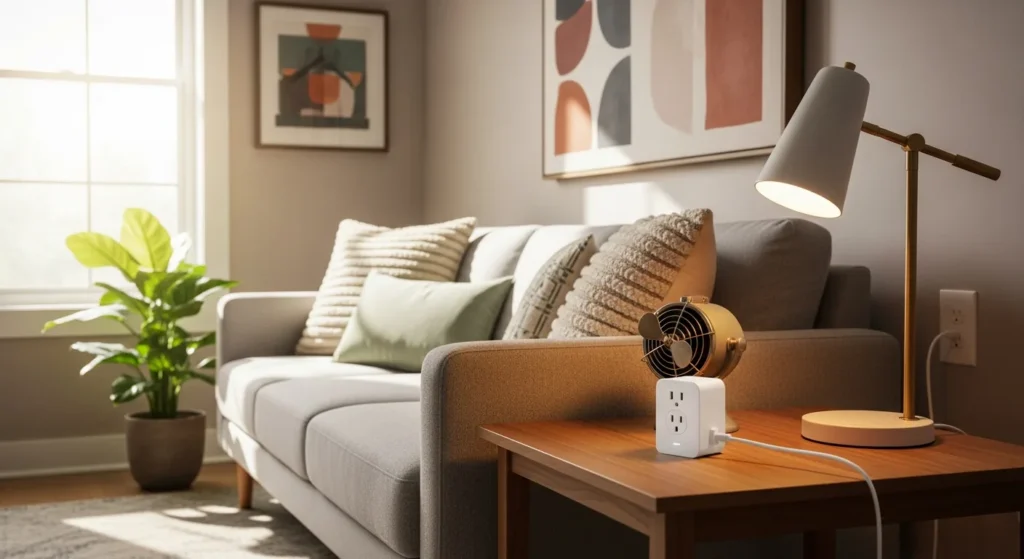
Smart plugs are the most underrated entry point into home automation. No wiring, no electrician, no compatibility anxiety — you plug them in, connect to Wi-Fi or Matter, and immediately control any device with your voice or phone. For under $25, a smart plug turns a floor lamp, coffee maker, or space heater into a scheduled, voice-controlled, energy-monitored smart device. Best Smart Home Devices Under \\$100 in 2026: 10 Picks
The best smart plugs in 2026 are the TP-Link Kasa EP25 (best overall for most buyers), the Meross Matter Smart Plug (best for multi-ecosystem homes), and the Eve Energy (best energy monitoring accuracy). This guide covers how to choose the right option for your setup, what the energy savings data actually shows, and the setup mistakes that turn a 3-minute installation into an hour of troubleshooting. Ultimate Living Room Makeover Guide Under $500: Avoid The…
Sources: U.S. Department of Energy standby power data, the Connectivity Standards Alliance’s Matter 1.2 specification, Lawrence Berkeley National Laboratory’s Home Idle Load Report, and long-term user reliability reports from r/homeautomation on Reddit. Home Office Setup Ideas for Small Space 2026: 15 Practical L
Why Are Smart Plugs the Easiest Smart Home Upgrade?
Smart plugs require none of the trade-offs that make other smart home on a budget upgrades complicated. Smart light switches need neutral wires many older homes don’t have. Smart thermostats require HVAC compatibility checks. Smart locks demand careful installation and security evaluation. Smart plugs require none of that — you push them into any standard outlet and you’re done.
That simplicity makes them the ideal first purchase in any smart home setup. But their value goes beyond convenience:
- They automate devices that can’t be made smart any other way. Your old floor lamp, a non-smart coffee maker, a box fan, a space heater — all become schedulable and voice-controlled without replacement.
- They eliminate phantom power drain. The U.S. Department of Energy estimates 5-10% of residential electricity comes from devices in standby mode. An energy monitoring smart plug makes this invisible waste visible and actionable.
- They enable meaningful automation. Pair them with sunrise/sunset triggers, geofencing when you leave home, or routines tied to other devices. The coffee maker that starts brewing as your alarm fires. The entertainment center that cuts power at midnight.
- They’re completely portable. Renters can use them freely. They move with you when you relocate. They’re reversible the moment you pull them out.
In 2026, the smart plug market has matured around the Matter standard. The fragmentation that once required you to choose between Amazon Alexa, Google Home automation guide, and Apple HomeKit before buying has been resolved: Matter-certified plugs work natively across all three platforms simultaneously from a single setup.
What Should I Look for in a Smart Plug in 2026?
Five criteria separate the best smart plugs from the rest. Understanding each one before buying prevents the most common purchase regrets.
Matter Certification
Matter is the universal smart home interoperability standard backed by Apple, Amazon, Google, and Samsung. A Matter-certified smart plug works natively with any of these platforms without ecosystem lock-in. If you ever add a different brand’s hub, switch from Amazon Echo to Google Nest, or move into a home with an existing smart system, your Matter plugs work without replacement.
For 2026 buyers: Matter support is worth the $5-10 premium over non-Matter alternatives for anyone planning to expand their smart home. If you’re purely testing the concept with a single device, a non-Matter plug is fine. If you’re buying more than two, go Matter.
Energy Monitoring
An energy monitoring plug tracks real-time wattage, daily and monthly consumption, and often calculates estimated cost based on your local electricity rate. This transforms a simple on/off switch into a diagnostic tool. The best energy monitoring plugs display live wattage in the app and send alerts when a device exceeds a threshold — useful for space heaters, older refrigerators, and any appliance you suspect is drawing more than it should.
Form Factor
A smart plug that blocks the adjacent outlet on a duplex receptor is a persistent frustration. Compact single-outlet designs that extend less than 2 inches from the wall and don’t obstruct the second outlet are worth seeking out specifically. Measure your outlet spacing if you plan to use two plugs side by side.
Voice Assistant Support
In 2026, the relevant platforms are Amazon Alexa, Google Home, and Apple Siri via HomeKit. Matter-certified plugs support all three simultaneously from the same device — no ecosystem choice required. If your household is single-ecosystem (all Amazon or all Google), this matters less. If you have mixed devices from different brands, Matter becomes essential.
Scheduling and Automation Quality
The app experience matters more than specs. Look for granular scheduling (time of day, day of week, sunrise/sunset offsets), vacation mode (randomized on/off to simulate occupancy), and integration with broader automation platforms. If you use Home Assistant, verify local API access — several plugs in this guide support it.
What Are the Best Smart Plugs in 2026?
After testing six leading models across reliability, app experience, energy monitoring accuracy, and ecosystem integration, here are the top picks:
| Product | Price | Matter | Energy Monitor | Ecosystems |
|---|---|---|---|---|
| TP-Link Kasa EP25 | $17-22 | Yes (1.0) | Yes | Alexa, Google, Siri |
| Meross Matter Smart Plug | $18-25 | Yes (1.2) | Select models | Alexa, Google, Siri, SmartThings |
| Eve Energy | $35-45 | Yes (Thread) | Yes (high accuracy) | Siri, Alexa, Google |
| Wemo Smart Plug | $28-35 | Yes (1.0) | No | Alexa, Google, Siri |
| Amazon Smart Plug | $15-20 | No | No | Alexa only |
| Govee Smart Plug | $12-18 | No | Yes (basic) | Alexa, Google |
TP-Link Kasa EP25 — Best Overall
The TP-Link Kasa EP25 is the recommendation for most buyers. It combines Matter certification, accurate energy monitoring, a compact single-outlet design that doesn’t block adjacent sockets, and the mature Kasa app — all at a mid-range price. Real-time wattage tracking updates every few seconds; the app shows daily, weekly, and monthly consumption with cost estimates based on your local electricity rate.
Key specs: 15A/1800W maximum load, Matter 1.0 over 2.4 GHz Wi-Fi, USB-A passthrough on some variants. Setup takes under two minutes. The Kasa ecosystem has strong scheduling features including sunrise/sunset offsets and countdown timers. Available in 2-pack and 4-pack bundles for significant savings per unit.
Best for: Anyone who wants a reliable, all-around smart plug with energy monitoring at a reasonable price. The 4-pack is the best value in the category for buyers equipping multiple outlets.
Meross Matter Smart Plug — Best for Multi-Ecosystem Homes
The Meross Matter Smart Plug demonstrates Matter’s real-world value better than any other product in this category. Matter 1.2 certification means it pairs natively with Alexa, Google Home, Apple HomeKit, and Samsung SmartThings — simultaneously, from a single device, without choosing. Add it to both your Google Home and your Amazon Echo at the same time; both work independently.
The MSS315 variant adds energy monitoring. The Meross app is competent for scheduling, though most users will manage the device primarily through their preferred ecosystem app.
Best for: Mixed-ecosystem households, Home Assistant users, and anyone future-proofing against ecosystem shifts. The MSS315 with energy monitoring is worth the extra few dollars.
Eve Energy — Best Energy Monitoring
The Eve Energy stands apart for the quality and depth of its energy monitoring. Built on Thread (the low-latency mesh networking protocol underlying Matter), Eve Energy provides wattage readings accurate to within 1-2%, tracks consumption historically with detailed graphs, and lets you set power thresholds and alerts. The Eve app’s energy visualization is the best in class for a consumer smart plug — genuinely useful for home office setup guide power tracking and high-draw appliance monitoring.
Key specs: 15A, Thread/Matter, local processing with no cloud dependency for core functions, Siri/Alexa/Google support. (source: U.S. Department of Energy home tips)
Best for: Energy-conscious households, home office power optimization, and anyone monitoring high-cost appliances like dehumidifiers, wine coolers, or electric heaters where accuracy matters. (source: EPA indoor air quality)
Wemo Smart Plug — Best App Experience
Wemo’s 2026 Matter edition delivers the most polished app experience in this roundup. Granular scheduling, clean automation flows, and Away Mode (randomized on/off during set hours to simulate occupancy) are all first-rate. Matter certification provides full multi-ecosystem support. The one genuine gap: no built-in energy monitoring, which is a real omission at this price point.
Best for: Users who prioritize app experience and automation sophistication over energy monitoring.
Amazon Smart Plug — Best for Alexa-Only Households
The Amazon Smart Plug is the fastest, most frictionless option for households already fully invested in Alexa. Setup is nearly automatic if you’re signed into the Alexa app — the plug is discovered and added without a separate app. No energy monitoring, no Google or HomeKit support, no Matter. If you’re Alexa-only and want simplicity above everything else, this works.
Best for: Alexa-exclusive households who want simplicity and don’t need energy monitoring or future ecosystem flexibility.
Govee Smart Plug — Best Budget
At $12-18, the Govee Smart Plug delivers Alexa and Google Home support, basic energy monitoring, and reliable on/off scheduling. It lacks Matter, which means no native HomeKit support and potential future compatibility concerns. But for a first smart home experiment or for high-quantity purchases in a workshop or garage, it delivers solid value.
Best for: First-time buyers testing home automation, or high-quantity purchases where budget per unit is the primary constraint.
You can find most of these options on Amazon with Prime shipping, and Home Depot carries the TP-Link and Wemo lines in-store if you want same-day.
Smart Plugs vs. Smart Switches: Which Do You Need?
Smart plugs and smart switches solve different problems. Knowing which one applies to your situation prevents the common mistake of buying the wrong product.
Smart plugs control whatever is plugged into them via an outlet. They’re ideal for floor lamps, fans, coffee makers, portable heaters, and any device with its own power cord. They don’t affect wall switches — if the wall switch controlling an outlet is off, the smart plug has no power and can’t respond.
Smart switches replace the wall switch itself and control hardwired fixtures — ceiling lights, built-in fans, exhaust fans. They require a neutral wire in most cases (older homes sometimes lack this), involve opening the electrical box, and are permanent installations. Renters should check lease terms before installing.
Use a smart plug when: the device plugs into an outlet, you rent and want no permanent modification, you need energy monitoring on a specific device, or budget is a primary constraint ($15-40 vs. $30-80+ for switches).
Use a smart switch when: the fixture is hardwired, you want a physical wall switch to remain functional for household members who won’t use voice commands, or you’re doing a renovation.
Most smart homes end up using both. Smart plugs for everything outlet-connected; smart switches for hardwired ceiling fixtures. Starting with smart plugs lets you test automation with minimal commitment before installing permanent switches.
How Much Energy Do Smart Plugs Actually Save?
The energy savings case for smart plugs is real but often overstated. Here’s what the data actually shows, without the marketing inflation:
The primary target is standby power — “vampire power” drawn by devices that appear to be off but continue consuming electricity. The U.S. Department of Energy estimates 5-10% of residential electricity comes from standby devices. For the average U.S. household paying $130/month on electricity, that’s $78-156 per year in standby waste.
Common high-standby devices:
– Older televisions: 5-25W standby
– Gaming consoles (older generations): 10-35W standby
– Desktop computers left on: 60-200W
– Cable boxes and satellite receivers: 15-20W continuous
– Inkjet printers: 5-10W standby
– Microwave ovens (for the clock): 3-5W continuous
A single energy monitoring smart plug on an entertainment center (TV + gaming console + cable box) typically reveals 30-50W of continuous standby draw. At the U.S. average electricity rate of $0.16/kWh, that’s $42-70 per year from that single outlet — addressable with a $20 smart plug and an “off at midnight” schedule.
Realistic savings target: $80-200 per year for a household actively using 4-6 smart plugs on high-draw standby devices with consistent off schedules. The Lawrence Berkeley National Laboratory’s Home Idle Load Report corroborates this range. It requires building the automations and maintaining them — the savings aren’t automatic.
Payback period for a $20 plug eliminating $50 of annual standby waste: about 5 months. Few home upgrades offer a faster financial return.
How Do I Set Up Smart Plugs with My Existing Smart Home?
Setup is straightforward, but two common mistakes account for most failed installations. Here’s the universal process plus what to watch for:
-
Confirm your Wi-Fi band. Most smart plugs require 2.4 GHz Wi-Fi. If your router broadcasts a combined 2.4/5 GHz network under one name, most plugs will automatically connect to 2.4 GHz. If you’ve separated the bands with different names, connect your phone to the 2.4 GHz network during setup.
-
Plug in the device. Insert the smart plug into the outlet. Most will flash an LED indicating pairing mode; if not, hold the button 5-10 seconds.
-
Open your app. For Matter plugs: open any compatible app — Amazon Alexa, Google Home, Apple Home, Kasa, Meross. For non-Matter plugs: open the manufacturer’s app exclusively.
-
Add the device. Tap the + icon and follow the scanning flow. Matter devices use a QR code printed on the plug or packaging — scan it with your phone camera directly in the app. Non-Matter devices use a Wi-Fi credential entry process.
-
Name it descriptively. “Plug 1” is useless in 6 months. Name it “Living Room Lamp” or “Coffee Maker” — something that makes sense in a voice command. “Turn on the coffee maker” works; “turn on plug 2” doesn’t.
-
Assign to a room. Room assignment enables group commands (“turn off all bedroom devices”) and improves automation targeting.
-
Create your first automation. Even a simple schedule — on at 7:00 AM, off at 11:00 PM — demonstrates the value immediately and prompts you to build more.
The two mistakes that cause most failed setups: attempting to connect to a 5 GHz-only network (results in a confusing error with no clear explanation), and trying to add multiple devices simultaneously rather than one at a time (makes diagnosing any issues nearly impossible).
What Smart Plug Mistakes Should I Avoid?
These mistakes show up consistently across buyer reviews and community troubleshooting threads:
Overloading the plug. Most smart plugs are rated for 15A/1800W. Space heaters (1500-2000W), window air conditioners (900-1500W), washing machines, and dishwashers often approach or exceed this. Always verify the appliance wattage on its label before connecting. Never use standard smart plugs with dryers, ovens, or HVAC equipment.
Buying non-Matter plugs right before a platform switch. If you’re considering moving from Alexa to Google Home, or adding HomeKit to your setup, non-Matter plugs become incompatible and require replacement. Spending $5-10 more per plug on Matter now prevents replacing your entire fleet later.
Generic naming. “Smart Plug 1” and “Smart Plug 2” become unmanageable at scale. Spend 30 seconds naming each plug for what it controls — your future self will thank you.
Ignoring the wall switch. Smart plugs need power to respond to commands. If a lamp’s wall switch is off, the smart plug is dead. Train household members to leave wall switches on permanently and control devices through the app or voice.
Stacking high-wattage devices on one circuit. Multiple plugs on the same 15A household circuit can trip a breaker even if each individual plug is within its rated load. Map your circuit panel before running several high-draw smart plugs in one room.
Skipping firmware updates. Smart plug security vulnerabilities are real and regularly patched. Enable auto-update in your app settings or check manually every few months. This is particularly important for any plug controlling devices that are on overnight or when you’re away.
FAQ: Best Smart Plugs 2026
Q: Do smart plugs work without Wi-Fi?
Most smart plugs require Wi-Fi for setup and cloud features like remote access and voice control. However, Thread-based Matter plugs like the Eve Energy can operate locally through a Thread border router even if your internet is down, maintaining local control. Non-Matter Wi-Fi plugs typically lose all remote functionality during internet outages but retain manual button control.
Q: Are smart plugs safe to use with high-wattage appliances?
It depends on wattage. Most smart plugs are rated 15A/1800W. Devices within this limit: lamps, fans, TVs, gaming consoles, coffee makers, phone chargers. Devices that often exceed the limit: space heaters (1500-2000W — borderline), window AC units (900-1500W), washing machines, dishwashers. Always verify the appliance wattage on its label before connecting. Never use standard smart plugs with dryers, ovens, or HVAC equipment.
Q: What is the difference between Matter and non-Matter smart plugs?
A Matter smart plug works natively with Alexa, Google Home, Apple HomeKit, and Samsung SmartThings through a single setup process — no brand-specific bridge required. Non-Matter plugs work only with their manufacturer’s ecosystem and specifically compatible voice assistants. In 2026, Matter support is worth the marginal premium for most buyers who plan to expand their smart home beyond one or two devices.
Q: Can I use a smart plug with an extension cord or power strip?
Yes, with caveats. A smart plug into a regular extension cord is generally safe as long as the cord’s amperage rating matches or exceeds the plug’s. Don’t plug a smart plug into another smart plug or a smart power strip — nested smart control creates confusion and overload risks. For controlling multiple devices from one point, use a smart power strip rather than stacking individual plugs.
Q: How do I know if my smart plug is saving energy?
The most direct indicator is an energy monitoring plug showing consistent standby draw when the device should be off. If your entertainment center shows 35W at 2:00 AM with no one home, you’re wasting roughly $49/year from that one outlet. Set a schedule to cut power overnight. Review your plug’s monthly consumption report — available in the Kasa, Eve, and Meross apps — and compare against your electricity bill. A device drawing 10W continuously for a month consumes 7.2 kWh, roughly $1.15 at average U.S. rates.
Q: Which smart plug app has the best energy monitoring interface?
Eve Energy’s app has the most detailed and clearly presented energy data in the category — historical graphs, threshold alerts, and cost estimates based on your local rate are all well-implemented. The Kasa app (TP-Link) is the runner-up: clear, functional, and covers daily/weekly/monthly views with cost estimates. Meross’s energy monitoring is competent but less polished. Govee’s is functional but basic.
Q: How many smart plugs should I start with?
Start with two or three on your highest-draw standby devices — typically the entertainment center, a home office computer setup, and a kitchen appliance like a coffee maker or toaster oven. This gives you enough automation triggers to understand the platform and identify which additional plugs would be useful, without over-investing before you know what you actually need.
Get the 4casahome digest
Honest reviews and no-hype guides — straight to your inbox. No spam, unsubscribe anytime.
Some links in our articles are affiliate links. See our full Affiliate Disclosure for details.
Written and tested by our editorial team
4CasaHome Editorial Team
Interior Design & Smart Home Experts
All product reviews are based on hands-on testing in real home environments. Smart home content is verified by our CEDIA-certified integrator. Meet our team.